Sessions
The Sessions view lists Claude Code and Codex sessions by state, shows where each one runs, whether its agent waits for you, the agent's plan and reports and what PacedMind heard from it, and has the buttons to resume, finish, request changes, answer the agent's questions, close, mark done or start the next session.
Sessions lists the agent sessions started from PacedMind, or reported by agents: Claude Code and Codex sessions started from PacedMind. The sidebar counts the finished ones that wait for review.
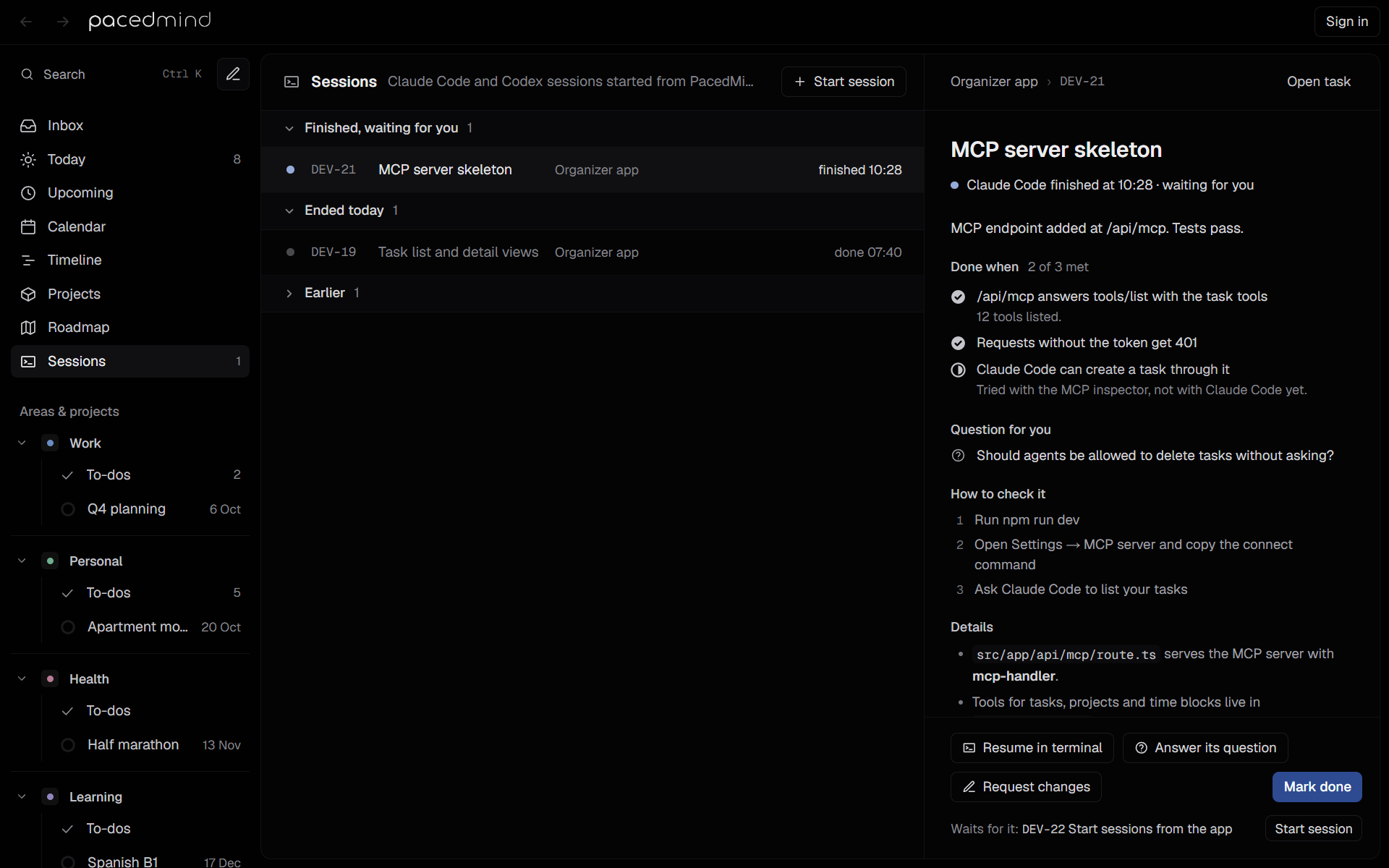
Groups
| Group | Contains |
|---|---|
| Finished, waiting for you | Sessions whose agent handed the task back, including hand-backs that are partly done or blocked. Newest first. |
| Needs attention | Sessions waiting for an answer, startup choice or first message, or paused on a limit or error. |
| Starting | Sessions waiting for the agent to check in, without a notice that needs attention yet. |
| Running | Sessions in progress, oldest first. |
| Ended today | Sessions that ended today: marked done, closed or failed. |
| Earlier | Older ended sessions, the latest 30. Collapsed unless the selected session is in it. |
Each row shows the session's state dot, the task's key and title, the project and the agent with its mark and the icon of where it runs (on wide windows), the number of screenshots, and a short state:
| State | Row text |
|---|---|
| Finished | finished 12:22; handed back partly done, partly done 12:22; blocked, stuck 12:22 |
| Starting | starting · waiting for check-in in a terminal, or send the first message in the Claude app or Codex app. After about 90 seconds without a terminal check-in: check agent startup, with instructions and a notification |
| Running | since 09:40, or in the cloud since 09:40. After Request changes: changes since 14:05, or answers since 14:05 after you answered its questions. When the agent waits for you: waiting for you, asks your permission, has a question, paused: usage limit, paused: model at capacity or paused: agent error, with a navy dot |
| Done | done yesterday 18:10 |
| Closed | closed before finishing |
| Failed | couldn't start |
The number of screenshots, with an image icon (3 images on hover), counts those in the agent's latest report and those it attached while it works.
Select a row to show its details. The selected session is part of the page's address, so a link to a session, such as from a notification or a task, opens it directly. Without one, the view selects the newest finished session, else the oldest running one, else the newest session.
Sessions not from PacedMind
Below PacedMind's own groups, Not from PacedMind, on this computer (…) lists the Claude Code and Codex sessions you started yourself: in a terminal (Claude Code, Codex CLI) or in the Claude or Codex app. The view's subtitle then reads Claude Code and Codex sessions on your computers. PacedMind finds them in the records the tools keep on the computer, without changing them, and lists the ones active in the last three days, 30 at most, the latest first. It leaves out sessions it started itself, which are in the groups above, sessions you archived in the Claude app, and conversations that programs run through the tools, such as summaries and checks.
When your data is on more than one computer (see Accounts and Cloud), each computer's sessions have a group of their own, such as Not from PacedMind, on Studio PC, with · offline when that computer isn't running PacedMind. A computer sends its list once a minute while PacedMind runs there, with times to five minutes; this computer's group is looked at again every 30 seconds while the view is open.
Each row shows a dot for the state, the session's title (its own, else its first message), its project, or its folder's name when no project has that folder, and where it runs:
| State | Row text |
|---|---|
| At work in the last two minutes | Working now |
| Its turn ended, or it stopped in the middle of one, such as for a permission | Waiting for you · 22:26 |
| Nothing for six hours | Idle since 11:33 |
A session's project is the one whose folder on that computer holds the session's folder, else the project of the same git repository, such as for a worktree kept elsewhere. Open these sessions in their own terminal or app.
Attach a session to a task
To bring a session you started yourself under a task, point at its row and select the link button (Attach to a task), then pick:
- New task: and the session's title: a new task with that title, in the session's project, else the Inbox;
- one of the open tasks, the session's project's first. Type to search them by key or title.
The session becomes one of the task's sessions, with the same conversation, on the computer it runs on, and leaves the list above. Attached to DEV-12 says so, and its details show Started … outside PacedMind and, in What PacedMind heard, Attached to DEV-12: it ran outside PacedMind, in Claude Code in my-app.
- A session that's working or waiting for you is Running, and the task goes to In progress. A task that already has a running session isn't offered for it.
- A session that has been quiet for six hours is finished, waiting for you, with its title as its note, and the task goes to In review: check the work, then Mark done, Request changes or Resume in terminal.
- A task that's yours can't take a session: hand it to Claude Code or Codex first.
From then on it's a session like the ones PacedMind starts. It has no hooks until PacedMind opens it itself: Reopen in terminal (once its own terminal is closed) reopens that same conversation in the folder it ran in, with PacedMind's hooks and its own token, so PacedMind hears when it waits for you or ends. When its agent calls start_task or finish_task for the task with your own connection to PacedMind, it reports on this session. A session in the Claude or Codex app opens in its app.
You can attach another computer's session from any computer, and from the web app. It keeps running on its own computer, where Resume in terminal works.
Start a session
Start session, in the header, lists up to 20 tasks an agent could pick up now: tasks in progress, to do or in the backlog, handed to an agent (their own or the project's), and without a running session. Tasks in progress come first, then those to do, then the backlog; within each, by priority, then by project and task order. Choosing one starts that task's agent where the task runs.
With no sessions yet, the view explains: Sessions appear here when you start one from a task. Open a task and choose Start with Claude Code or Codex, or ask an agent in a chat to start one.
Session details
The details panel shows the project and the key, Open task, the task's title, and a line about the state:
- Running in Claude Code since 09:40 (or Starting), and outside a terminal with the place: Running in the Claude app on DESKTOP-1 since 09:40 or Running in Claude Code on the web since 09:40;
- Claude Code is waiting for you in its terminal: “…”, Claude Code asks for your permission in its terminal: …, Claude Code asks you something in its terminal: … or Claude Code asks you: …, with a navy dot, while the agent waits for you. See When the agent waits for you;
- Claude Code is working on your changes since 14:05, after Request changes;
- Claude Code is working with your answers since 14:05, after you answered its questions;
- Sending to Codex cloud since 09:40, while Codex takes the task on;
- Claude Code is asking whether you trust this folder. Choose “Yes, I trust this folder” in its terminal., for a terminal session in a folder Claude Code doesn't trust yet, until the agent checks in. With Trust session folders on, only when PacedMind couldn't answer that question itself. See Trusting the folder;
- Claude Code hasn't checked in yet. It may be waiting for you in its terminal., or in a desktop app Opened in the Claude app. Send the first message there to start.;
- Claude Code finished at 12:22 · waiting for you;
- Claude Code handed back part of it at 12:22 · waiting for you, for a hand-back that is partly done;
- Claude Code got stuck at 12:22 · needs you, for a blocked one;
- Done · Claude Code finished at 12:22;
- Closed before the agent finished;
- Couldn't start: and the reason.
A question the agent asks with ask_user shows under that line, with a field for your answer and Send answer. See Answer while it works.
Under it comes the agent's report, with the same parts as in the task's details: the summary, the Done when answers with a count such as 2 of 3 met, screenshots, questions, How to check it, Details, links and follow-ups, and what you asked to change. Here the Done when part lists every item of the report with the agent's answer and note. Click a screenshot to open the image viewer. A session without a report shows the agent's note in quotes, and screenshots the agent attaches while it works show under Images so far. While the session runs, Plan shows the latest plan the agent sent with report_progress: its steps in order, the done ones ticked off, with a count and the time, such as 2 of 5 done · 14:05.
A session handed back more than once, after Request changes or after it was resumed, has a report for each hand-back, newest first. The arrows next to the state line (Older report, Newer report) page through them, with the position between them, such as Report 2 of 2.
Below them come the session's fields:
| Field | Shows |
|---|---|
| Agent | Claude Code or Codex, with its mark. |
| Runs in | Where the session runs: Terminal on DESKTOP-1, Claude app on DESKTOP-1, or Claude Code on the web. |
| Folder | Where the agent works. |
| Branch | The branch name recorded for the session. |
| Started | When, and how: from PacedMind, or outside PacedMind for a session an agent reported on its own or one you attached to the task. |
| Duration | How long the agent worked: until now while it runs, else until it finished or its terminal closed. |
| Working | How long the agent was at work, as it reported it, without the time it waited for you. |
| Tokens | The tokens the agent read and wrote, as it reported them, such as 262k tokens, 246k of them from cache, 1.5k output. |
| Model | The models the agent ran, the latest first. |
| Client | For a session PacedMind started in a terminal, what it connected to PacedMind from: the name and version its MCP client gave, such as Claude Code 2.1.278. |
| Agent says | What the session runs with, as of when the agent called start_task: the model it said, and the MCP servers it has tools from, such as runs as …, with the MCP servers github, playwright; the claude.ai connectors Gmail or runs as …, with no other MCP servers. For Claude Code in a terminal, the servers come from Claude Code's own record of the session. |
| Not available | For Claude Code in a terminal, MCP servers the session should have but has no tools from, and why, such as stripe needs you to sign in (/mcp in its terminal) or github didn't start (ENOENT). See What a session actually has. |
| Session | The session's id, which agents use in start_task and finish_task. |
| Claude session | For Claude Code in a terminal, its own conversation id, used to resume it. |
Working, Tokens and Model show for sessions in a terminal, once the agent has reported them. See What it used.
What PacedMind heard lists the session's events with their times, such as Opened Claude Code in a terminal on DESKTOP-1: you started it here. Waiting for the agent to check in., Claude Code read the task over MCP, Claude marked it finished, You marked it finished, You marked it done, You asked for changes: with the start of what you wrote, You answered its questions: with the start of your answers, Plan: 2 of 5 steps done, Claude Code is waiting for you in its terminal, You answered in its terminal, and Claude Code went on, You closed the session, Terminal closed before the agent finished or Reopened in a terminal. See How a session runs for all of them.
Buttons
| Button | When | Result |
|---|---|---|
| Resume in terminal | A terminal session that isn't running and didn't fail. | Opens a terminal in the session's folder again. Claude Code continues the same conversation; Codex continues its most recent session in the folder. |
| Reopen in terminal | A running terminal session on this computer, in the desktop app. | For one whose terminal is gone: asks first, then continues the conversation in a new terminal. See Resume a session. |
| Continue in Claude app | A Claude Code session from a terminal. | Moves the conversation into the Claude app. |
| Open the Claude app or Open the Codex app | A session in a desktop app. | Brings the app forward. |
| Open the task or Open Claude Code on the web | A cloud session. | Opens the Codex cloud task, or Claude Code on the web, in the browser. |
| Pull into terminal | A Claude Code on the web session. | Opens a terminal in the folder with claude --teleport, which pulls a cloud session and its branch in. |
| Mark finished | A running session outside a terminal, which may not report back. | The session is finished and the task goes to In review, as if the agent had handed it back. |
| Request changes | A terminal session on this computer whose agent handed the task back, finished or done after you marked the task done, with the task's latest report. Not for a task that is yours, or while another session of it runs. | Opens a box above the buttons to write what should change (What should change? Be as specific as you'd be with a colleague.). Send to Claude Code, or Ctrl+Enter, sends it: the session reopens in a new terminal (Sent to Claude Code in a new terminal), and the task goes back to In progress. Cancel or Esc closes the box. |
| Answer its question or Answer its questions | As for Request changes, when the agent's latest report has questions for you. | Opens a field for each question (Your answer) and one for Anything else it should know (optional). Send to Claude Code, or Ctrl+Enter, sends your answers the way Request changes sends changes. See Answer the agent's questions. |
| Close session | The session is running. | Asks Close this session in PacedMind? The terminal stays open., or for a session outside a terminal Close this session in PacedMind? It keeps running where it is., then marks the session closed. A task in progress goes back to Todo. |
| Mark done | The agent finished. | Marks the task done. The session counts as reviewed. |
The line under the Request changes box says how the agent goes back to work: Claude Code starts again in a new terminal, with its last report and your changes. Claude Code and Codex both start a new conversation. PacedMind opens a new tab in Windows Terminal, and a new window otherwise. The session moves to Running, with Claude Code is working on your changes since 14:05, until the agent hands the task back with a new report. For Claude Code, Claude session then shows the new conversation's id. See Request changes.
Sessions in the Claude or Codex app, or in the cloud, don't offer Request changes: write the changes to the agent where it runs, with Open the Claude app, Open the Codex app, Open the task or Open Claude Code on the web. Neither do earlier sessions of a task whose newer session has the latest report, and sessions that ran on another computer: ask for their changes in PacedMind there.
Under the buttons, Waits for it: names an open task that waits for this session's task (a dependency), the first in the project's order, with Start session when that task is still to do or in the backlog and has no running session. Nothing starts it by itself.
See Agent sessions for the whole life of a session.
Roadmap
The roadmap shows when each project runs and in which order a project's tasks come, and holds the project's session settings.
Agent sessions
PacedMind starts Claude Code and Codex on tasks in a terminal, in their desktop apps or in their cloud, and tracks each session until the agent hands the work back for your review.