Roadmap
The roadmap shows when each project runs and in which order a project's tasks come, and holds the project's session settings.
The Roadmap answers two questions: when do the projects run, and in which order does one project's work happen.
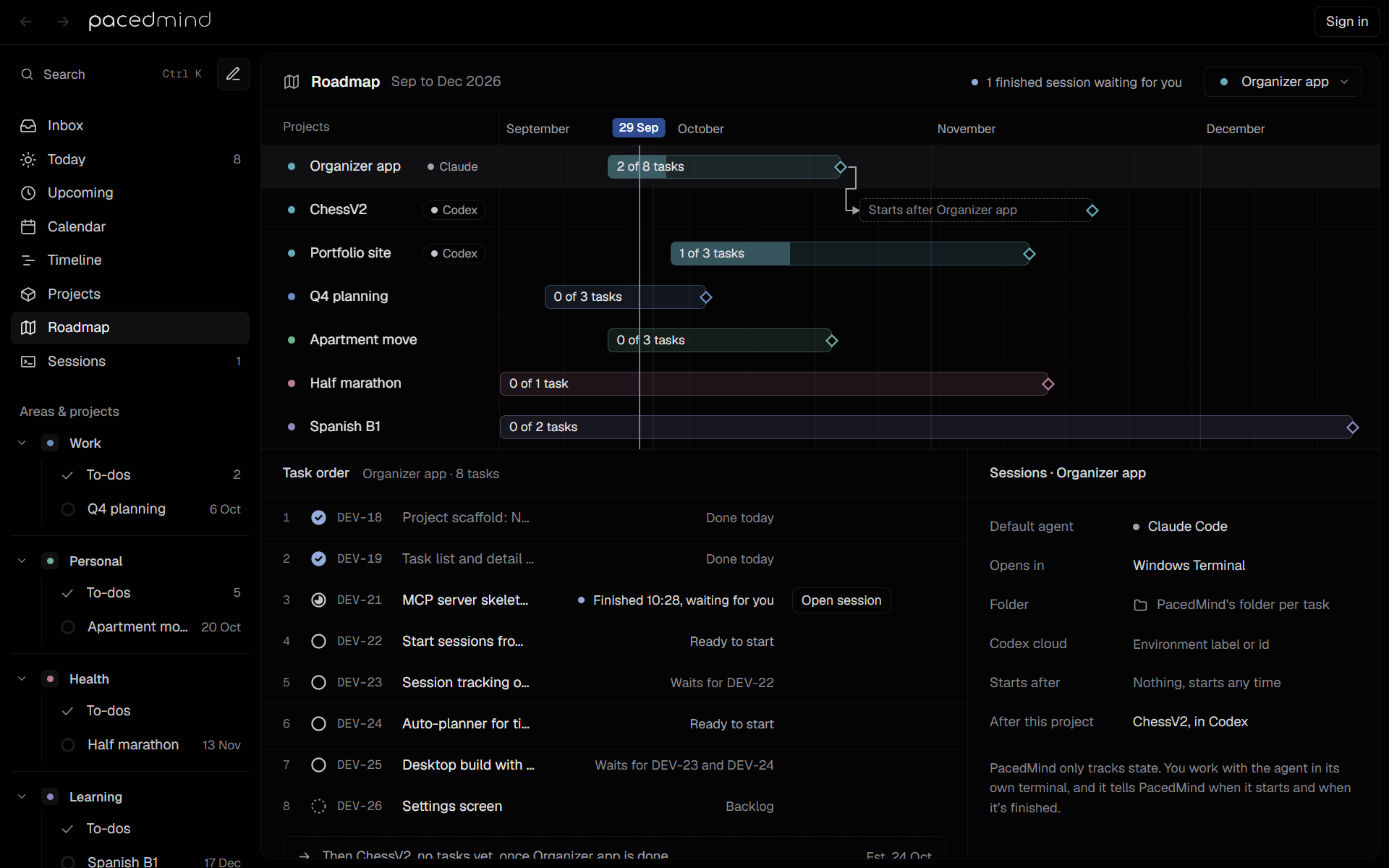
The header
- The months covered, such as Sep to Dec 2026.
- 2 finished sessions waiting for you, when agents have finished work to review. Select it to open Sessions.
- The project picker, at the right, which switches the selected project.
The roadmap opens on the project from its link (Open roadmap in a project's menu, or Roadmap on a project page), else on the first project with open tasks, else on the first project.
Project timeline
The top part shows every project on a 14-week timeline that starts two weeks before the current week.
- Each row has the project's area logo, icon or colored dot beside its name, and its default agent (Claude or Codex) when it has one. Projects without an area use a dot in the project's color. The project menus use the same marks.
- The bar runs from the start date to the target date. Without a start date, it starts today; without a target date, it runs to the end of the range. The filled part shows the done tasks, and the label counts them, such as 3 of 8 tasks, or says No tasks yet.
- A project that hasn't started and starts later has a dashed bar labeled Starts 5 Oct, or Starts after the project it waits for.
- A hollow diamond marks the target date. The current day is labeled at the top and marked with a navy line.
- Arrows connect a project to the ones that start after it.
- A project without dates says No dates yet.
Select a project's row to select that project.
Task order
The lower left part, Task order, lists the selected project's tasks (canceled ones left out) in the project's roadmap order. Agents follow the same order: it decides which task get_next_task offers first. Task lists use it too, after priority.
Each row shows the position, the status, the key and the title, then:
- the tasks it waits for (dependencies), such as After DEV-19, DEV-21, or Done by you for a task that is yours and waits for none;
- what the task is doing or waiting for, such as Running in Claude Code, Finished 12:22, waiting for you (with a navy dot), Partly done 12:22, waiting for you, Blocked 12:22, needs you, When you mark DEV-21 done, Waits for DEV-22, Ready to start or Planned for today;
- Open session, for a finished session that waits for review.
Hover a row and use the arrows (Move up, Move down) to change the order. Select a row to open the task's details.
After the list, a dashed row names the project that starts once this one is done, such as Then Portfolio site, 3 tasks, once Organizer app is done, with its estimated start.
Session settings
The right part, Sessions and the project's name, sets how the project's agent sessions run. It gives way to the task's details while a task is selected.
| Setting | Meaning |
|---|---|
| Default agent | Claude Code or Codex, for tasks that don't name their agent. |
| Opens in | The terminal sessions open in, as set in Settings → Sessions: Windows Terminal or Command Prompt on Windows, Terminal or iTerm on macOS. |
| Folder | The folder sessions work in on this computer: the project's own, the area's workspace (area's), or PacedMind's folder per task when there's neither. Click it to choose a folder in the system's folder dialog (in a browser, type the path and press Enter); × removes it. |
| Codex cloud | The Codex cloud environment the project's tasks run in when they run in Codex cloud: its label or id from chatgpt.com/codex/settings/environments (Environment label or id when empty). It's saved when the field loses focus or on Enter. |
| Starts after | Nothing, starts any time, or a project that must finish first. |
| After this project | Nothing, or the project that starts once this one is done. Choosing one replaces any project that followed before. |
The menus leave out projects that would make two projects wait for each other. The note below the settings sums up PacedMind's part: PacedMind only tracks state. You work with the agent in its own terminal, and it tells PacedMind when it starts and when it's finished.
With no projects, the roadmap says No projects yet.
Projects
The Projects page lists every area and project with progress, open tasks, target date, agent and folder; area and project pages list their tasks.
Sessions
The Sessions view lists Claude Code and Codex sessions by state, shows where each one runs, whether its agent waits for you, the agent's plan and reports and what PacedMind heard from it, and has the buttons to resume, finish, request changes, answer the agent's questions, close, mark done or start the next session.