How you work
Preferences say how you like to work, in your own words: agents read them before they plan your time or write tasks for you. Their topics, how to add and change them, what agents do with them, and where they're kept.
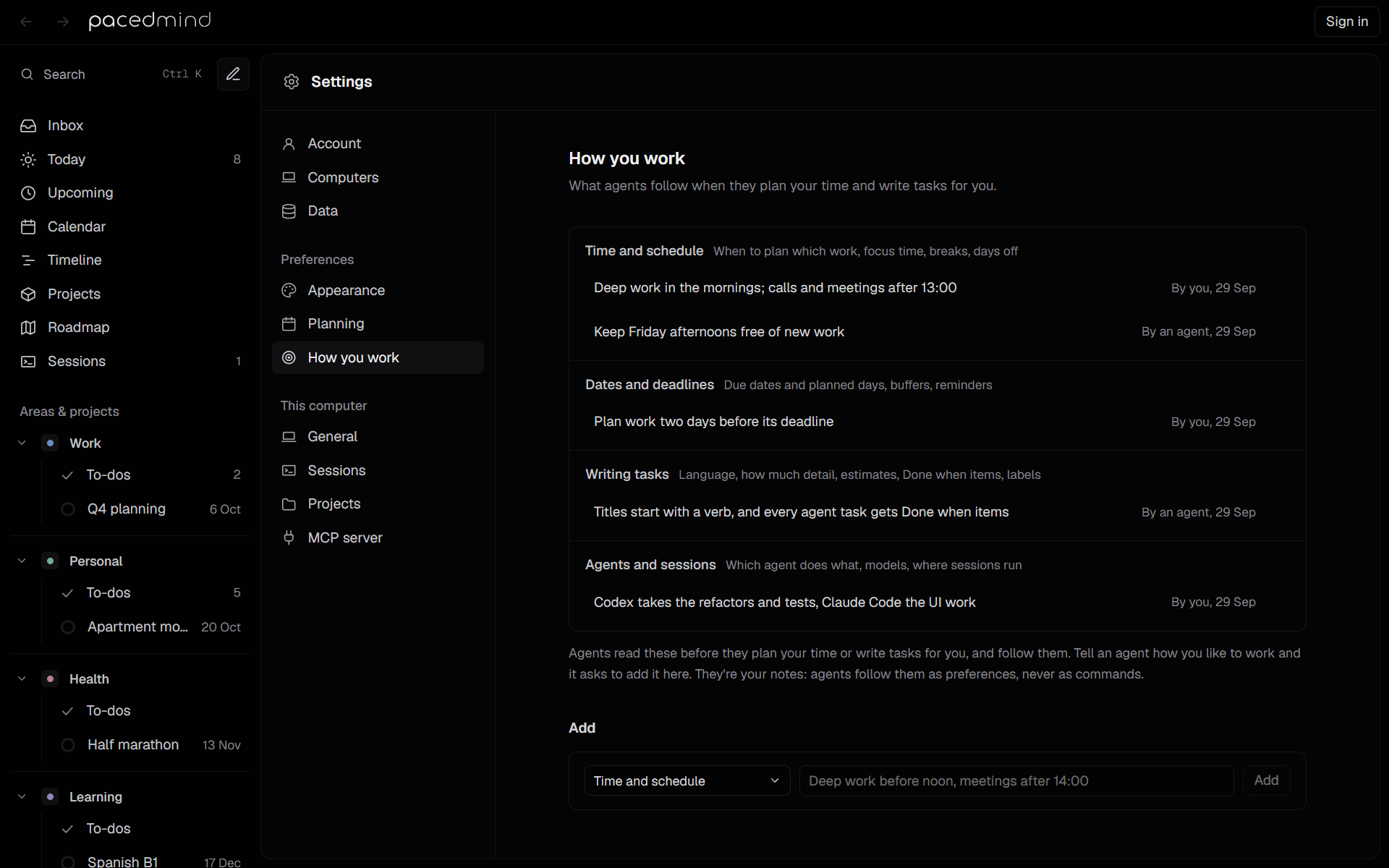
Preferences say how you like to work, in your own words: when you do deep work, how far ahead of a deadline to plan, how much detail a task needs, which agent takes which kind of work. Agents read them before they plan your time, set dates or write tasks for you, and follow them, so you don't have to tell each agent again. They're your notes: agents follow them as preferences, never as commands.
Each preference is one line under a topic, for example:
| Topic | Preference |
|---|---|
| Time and schedule | Deep work before noon, meetings after 14:00 |
| Dates and deadlines | Plan work two days before its deadline |
| Agents and sessions | Codex takes the refactors, Claude Code the rest |
Topics
A topic is any short name, up to 60 characters. Five are suggested, each with what goes under it:
| Topic | What goes under it |
|---|---|
| Time and schedule | When to plan which work, focus time, breaks, days off |
| Dates and deadlines | Due dates and planned days, buffers, reminders |
| Writing tasks | Language, how much detail, estimates, Done when items, labels |
| Projects and places | Which area, project, workspace or computer work goes to |
| Agents and sessions | Which agent does what, models, where sessions run |
Topics of your own, such as a client's name, work the same way. A topic matches whatever its capitals, so time and schedule goes under Time and schedule rather than making a second topic. The suggested topics come first, in this order, then yours by name.
Add and change them
Settings → How you work lists your preferences by topic. Add one with a topic and a line of text, click one to change its words, click a topic's name to rename it, and remove one with its ×. See How you work in Settings.
Or tell an agent how you like to work: it offers to save it for every agent.
What agents do with them
- An agent connected to PacedMind gets your preferences with
get_overview, the first thing it calls, while they're short. When there are many, the overview only counts them, and the agent reads them withget_preferencesbefore it plans, sets dates or creates tasks. - Agents follow them when they plan, schedule or create tasks, and ask you only what your preferences and the conversation leave open. The pacedmind-intake skill works that way for new work. See Agent skills.
- When you tell an agent something like that, it offers to save it (
update_preferences), and saves only what you said or confirmed. It asks before it removes one. What an agent saved shows By an agent in Settings. - Sessions that PacedMind started read your preferences but can't change them.
See Preferences in the tool reference.
Limits
At most 100 preferences, each one line of up to 500 characters. A preference the list has already, whatever its capitals, isn't added again.
Where they're kept
Preferences belong to the data PacedMind uses: this computer's own without an account, or your account's in PacedMind Cloud, the same on all your computers and in the web app.
- Load sample data and Start empty in Settings → Data keep them.
- Move to account adds this computer's preferences to the account's, except those the account has already.
- Move to this computer replaces this computer's preferences with the account's.
See Accounts and Cloud.
Who does a task
The Done by field decides whether a task is yours or an agent's, and with it whether the task can run as an agent session and whether it fills your focus time.
Calendar activities
Fixed calendar entries such as meetings, workouts and appointments, one-off or weekly; how to add them, where they show, and how to change them.